Posted
Filed under .NET/C#
도로명 주소 OpenAPI 신청 방법 : https://www.juso.go.kr/addrlink/addrLinkRequestMainNew.do?cntcMenu=API 

소스는 아래와 같습니다. 
XML Data를 읽어와 DataSet으로....
Web에서 사용하던 내용을 CS 단으로 적용 시킨 내용 입니다.

프로그램 실행 결과입니다.
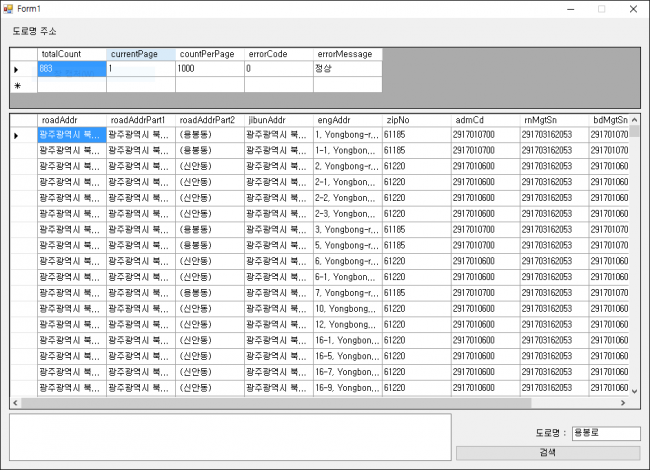
사용자 삽입 이미지


프로그램 소스 코드 입니다.
using System;
using System.Collections.Generic;
using System.ComponentModel;
using System.Data;
using System.Drawing;
using System.Text;
using System.Windows.Forms;
using System.Net;
using System.Xml;

namespace WindowsApplication2
{
    public partial class Form1 : Form
    {
        string currentPage = "1";  //현재 페이지
        string countPerPage = "1000"; //1페이지당 출력 갯수
        string confmKey = "TESTJUSOGOKR"; //테스트 Key
        string keyword = string.Empty;
        string apiurl = string.Empty;

        public Form1()
        {
            InitializeComponent();
        }

        private void button1_Click(object sender, EventArgs e)
        {
            try
            {
                keyword = textBox1.Text.Trim();
                apiurl = "http://www.juso.go.kr/addrlink/addrLinkApi.do?currentPage=" + currentPage + "&countPerPage=" + countPerPage + "&keyword=" + keyword + "&confmKey=" + confmKey;

                textBox2.Text = apiurl+"\r\n";

                WebClient wc = new WebClient();

                XmlReader read = new XmlTextReader(wc.OpenRead(apiurl));

                DataSet ds = new DataSet();
                ds.ReadXml(read);

                dataGridView2.DataSource = ds.Tables[0];

                DataRow[] rows = ds.Tables[0].Select();

                textBox2.Text += rows[0]["totalCount"].ToString();

                if (rows[0]["totalCount"].ToString() != "0")
                {
                    dataGridView1.DataSource = ds.Tables[1];
                }
                
            }
            catch (Exception ex)
            {
            }
        }
    }
}
2016/03/10 09:02 2016/03/10 09:02
Posted
Filed under .NET/C#
널 병합 연산자는 값이 null이면, 이 때 해당되는 다른 값을 사용한다 는 것을 표현하는 간결한 방식.

string fileExt = null;
string filePath = fileExt ?? ".txt";
위 예제는 fileExt 값이 null 이면, filePath 에 값을 ".txt"로 설정하는 널 병합연산자이다.
널을 허용 하는 값 형식과 함께 널 병합 연산자가 C# 2.0 에서부터 추가.
널 병합 연산자는 두개의 널 호용 값 형식의 피연산자와 참조 형식에서 동작.
2014/12/27 23:03 2014/12/27 23:03
Posted
Filed under .NET/C#
using System;
using System.Collections.Generic;
using System.Linq;
using System.Text;
using System.Threading.Tasks;

//Using Mysql Namespace
using MySql.Data.MySqlClient;
using MySql.Data.Types;
using System.Data;

namespace WindowsFormsApplication2
{
    public class MySqlConn
    {
        #region ===== MySQL Connection =====
        MySqlConnection _conn = new MySqlConnection();
        string _connString = "Server=127.0.0.1;Database=DB명;Uid=계정명;pwd=비밀번호";

        /// 
        /// MySQL 연결
        /// 
        public void MySQLConnection()
        {
            try
            {
                _conn.ConnectionString = _connString;
                _conn.Open();
            }
            catch (Exception ex)
            {
                Console.WriteLine(ex.Message);
            }
        }

        /// 
        /// MySQL 연결 해제
        /// 
        public void MySQLDisConnect()
        {
            if (_conn != null)
                _conn.Close();
        }
        #endregion

        public DataSet GetMemberList()
        {
            MySQLConnection();
            string strQuery = "SELECT * FROM Member";
            //_conn.ConnectionString = _connString;

            MySqlCommand cmd = new MySqlCommand();
            cmd.Connection = _conn;

            DataSet ds = new DataSet();
            MySqlDataAdapter da = new MySqlDataAdapter(strQuery, _conn);
            da.Fill(ds, "Member");

            MySQLDisConnect();

            return ds;
        }

        public int SetMemberList(string[] arrParam)
        {
            MySQLConnection();

            string strQuery = "Insert Into Member(EMAIL, KOR_NM, PASSWORD) VALUES(@Email, @KOR_NM, @PWD)";
            //_conn.ConnectionString = _connString;
            
            MySqlCommand InsertCommand = new MySqlCommand();
            
            InsertCommand.Connection = _conn;
            InsertCommand.CommandText = strQuery;

            InsertCommand.Parameters.Add("@Email", MySqlDbType.VarChar, 200);
            InsertCommand.Parameters.Add("@KOR_NM", MySqlDbType.VarChar, 100);
            InsertCommand.Parameters.Add("@PWD", MySqlDbType.VarChar, 100);

            InsertCommand.Parameters[0].Value = arrParam[0];
            InsertCommand.Parameters[1].Value = arrParam[1];
            InsertCommand.Parameters[2].Value = arrParam[2];

            int intResult = InsertCommand.ExecuteNonQuery();

            MySQLDisConnect();

            return intResult;
        }

        public DataSet GetIDCheck(string userID)
        {
            DataSet ds = null;
            string strQuery = "SELECT EMail from Member Where Email='" + userID + "'";
            MySQLConnection();

            MySqlCommand cmd = new MySqlCommand();
            cmd.Connection = _conn;

            ds = new DataSet();
            MySqlDataAdapter da = new MySqlDataAdapter(strQuery, _conn);
            da.Fill(ds, "Memeber");


            MySQLDisConnect();

            return ds;
        }
    }
}
2013/07/10 11:16 2013/07/10 11:16